




Surfshark Alternative ID, an innovative feature integrated into the Surfshark VPN service, generates an alternative online persona complete with a disposable email address, effectively shielding your actual identity from exposure. In this review, we’ll delve into the functionality of Surfshark Alternative ID and explore why it stands out as the premier solution for safeguarding your online identity.
Table of Contents
① How Surfshark Alternative ID Can Help You
Surfshark Alternative ID provides me with an alternative online persona, allowing me to navigate the internet without the fear of exposing my real identity. This feature proves invaluable when I need to engage in activities such as subscribing to newsletters from online stores, exchanging my email for a free e-book, or trying out services or online courses without divulging personal information. With Surfshark Alternative ID, I can safeguard my privacy effortlessly while enjoying the vast offerings of the internet.
One of the primary benefits of Surfshark Alternative ID is its ability to generate temporary email addresses. For instance, during online shopping or website sign-ups, I can utilize an alternative identity along with a temporary email address, mitigating the risk of revealing my true identity. The primary motivation behind using Surfshark Alternative ID is to shield my authentic email address from spam and misuse.
Here are a few scenarios where Surfshark Alternative ID proves most advantageous:
- Online shopping: Prevent incessant newsletters from online stores after making a one-time purchase.
- Newsletter subscriptions: Safeguard your email address by using an alternative ID for newsletter subscriptions, especially from websites that may sell your email.
- Trial subscriptions: Utilize an alternative identity to avoid unsolicited communications post-trial, often aimed at persuading payment.
- Contests and freebies: Safeguard your primary email from spam while participating in online contests.
- Discussion forums: Engage in discussions without exposing your primary email address to potential spammers.
② How to Create an Alternative Identity and Disposable Email
As mentioned earlier, the Surfshark Alternative ID service is a feature included in the Surfshark VPN package, thus requiring a subscription. Its most beneficial offering is through Surfshark One, which not only provides VPN and an alternative identity but also additional privacy protection tools, including Surfshark antivirus.
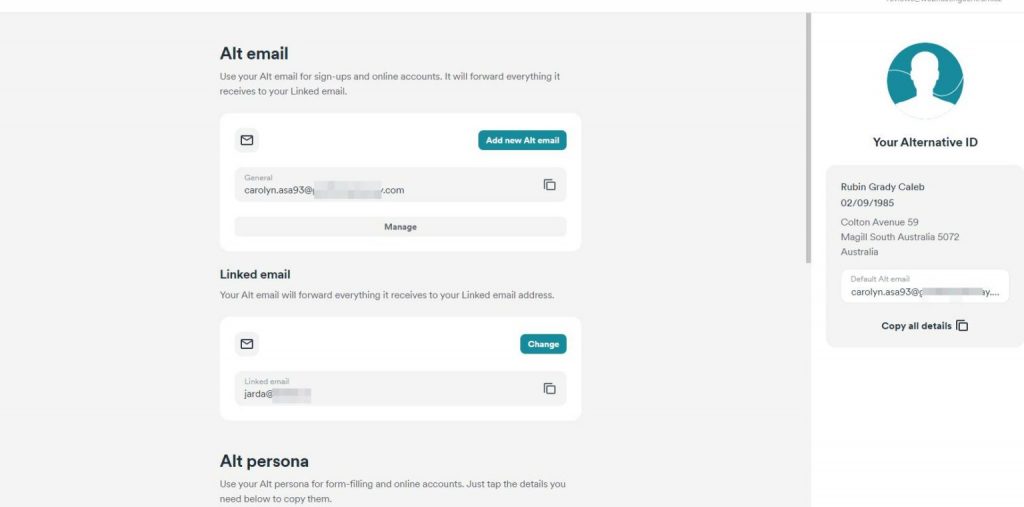
Creating an alternative identity is straightforward with Surfshark. Unlike using their application, you can obtain a new identity through the web interface and use it independently.
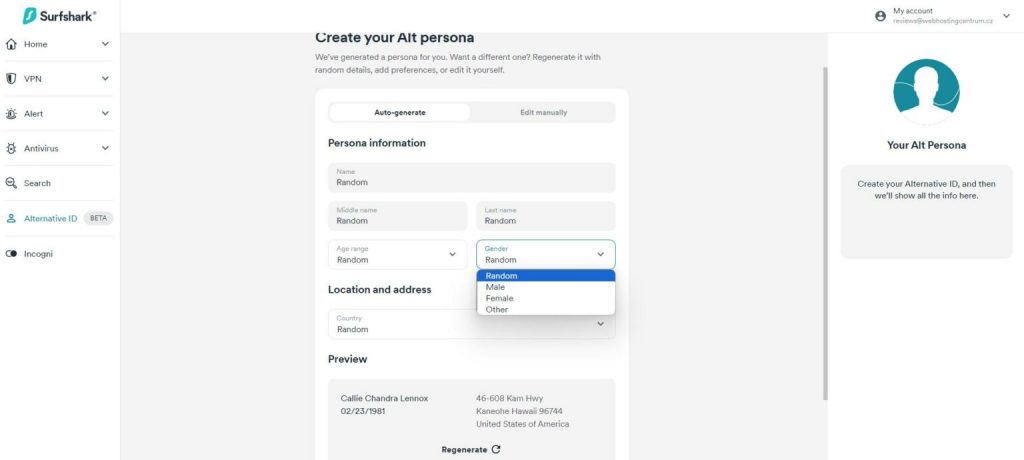
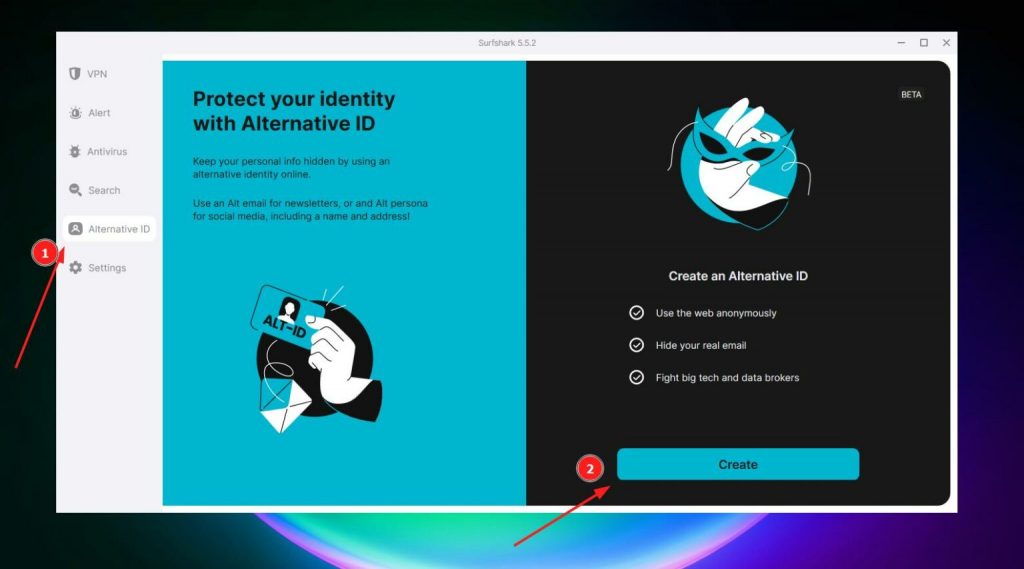 Setting up your alternative identity is hassle-free. The service automatically generates a random name, age, gender, etc., for you. However, you have the option to manually adjust this information, particularly the gender and country of origin. Additionally, the service generates an alternative postal address.
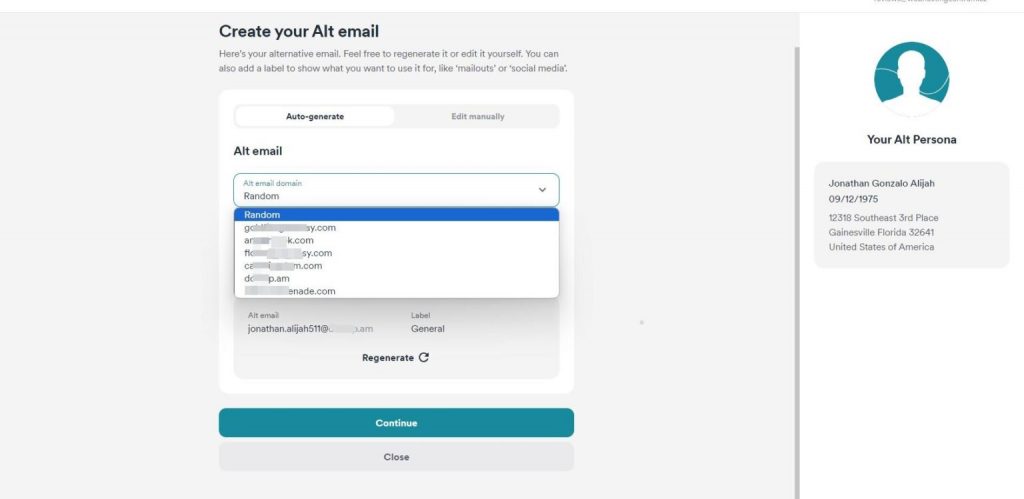
Next, you’ll create a disposable email address. You can choose from various domains and even customize the part before the “@” sign if desired.
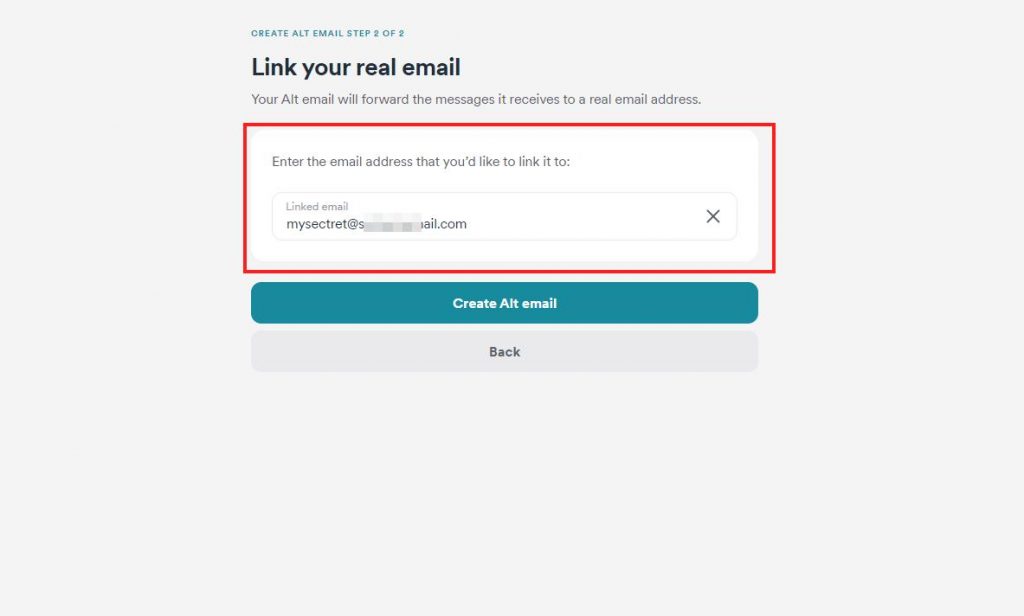
Finally, you’ll specify the email address where messages from the alternative email address will be forwarded. This step requires confirmation from your inbox.
In the end, you’ll have created an alternative identity with details that you can safely use across the internet.
③ How to Further Protect Your Online Identity
Utilize a VPN to encrypt your internet connection and conceal your IP address, thus making it challenging for online activities to be tracked. VPNs are valuable not only for safeguarding your privacy while using public Wi-Fi or accessing region-restricted content but also for their integration with features like Surfshark Alternative ID. For more information, refer to the Surfshark review.
Exercise caution when providing your email address online, as it plays a pivotal role in safeguarding your online privacy and security. Each instance of sharing your email address heightens the risk of spam, phishing attempts, and other cyber threats. Avoid disclosing your email address on suspicious-looking websites or those with negative user reviews. Furthermore, refrain from exchanging email addresses for promises of free content or similar offers.
I understand the challenges of today’s digital landscape, where enticing e-books, courses, and freebies inundate you with offers, and stores and services relentlessly vie for your email address. Hence, it becomes imperative to utilize services like Surfshark Alternative ID for disposable emails. Reserve a distinct email address for registrations on websites you don’t frequent or where there’s a risk of spam, such as forum registrations, blog comments, or newsletter subscriptions. By doing so, you shield your primary email address from potential spam and safeguard your online presence.
④ Surfshark Alternative ID Pricing
CleanWeb is included in all Surfshark VPN subscription plans. You don’t have to pay anything extra for it. Here are its main plans and prices:
| Subscription Plan | Monthly Price |
| One month | $10.99/month |
| 1-year plan | $3.99/month |
| 2-year plan | $2.39/month |
The best value for money is with its 2-year plan for $2.39/month. Alternatively, if you’re not keen on a long-term option, the 1-year plan for $3.99/month or just a single-month plan for $10.99 is also available. For what it offers, Surfshark CleanWeb is very affordable compared to its contenders – Total Adblock or NordVPN Threat Protection, also varying around the same price.
Surfshark CleanWeb is also included in the Surfshark One bundle, in which you also get a VPN and antivirus package. It’s ideal if you want an all-around security suite. However, if you’re looking for an ad blocker only, Surfshark CleanWeb (included in a VPN package) will do the job.
Here are the payment options that Surfshark accepts:
- Credit card (Visa, Mastercard, American Express, Discover)
- PayPal
- Google Pay
- Apple Pay
- Cryptocurrency (Bitcoin, Ethereum, Litecoin, Ripple)
- Surfshark gift card
If you’re not sure which subscription plan is right for you, Surfshark offers a 30-day money-back guarantee or a 7-day free trial. So, you can try it risk-free and see if you like it.
⑤ Customer Support
24/7 live chat: This option offers easy and readily available support. We found it convenient as we were able to connect with a customer support representative within a few minutes. They promptly and accurately addressed our inquiries.
Knowledge base: Surfshark’s knowledge base proved to be comprehensive and user-friendly during our testing. It was easy to navigate, and we could find answers to most of our questions without needing to reach out to customer support.
Email: For issues not covered in the knowledge base or live chat, you can always reach out to Surfshark via email. We tested this option and received a response from Surfshark’s customer support team within 24 hours, demonstrating its effectiveness and relatively swift turnaround time.
⑥ In summary
Surfshark Alternative ID proves to be a multifaceted solution for safeguarding online privacy and security. Integrated seamlessly into the Surfshark VPN service, it offers users the ability to create alternative online identities complete with disposable email addresses, shielding their real identity from exposure. This feature proves invaluable for various online activities, from subscribing to newsletters to engaging in forum discussions, effectively minimizing the risk of spam and phishing attempts. With Surfshark Alternative ID, users can navigate the internet with confidence, knowing that their personal information remains protected.
⑦ FAQ
Surfshark Alternative ID is a feature integrated into the Surfshark VPN service that allows users to create alternative online identities, including disposable email addresses, to protect their real identity.
Surfshark Alternative ID works by generating random information, such as names, ages, genders, and even postal addresses, to create alternative online personas for users.
Yes, Surfshark Alternative ID is included in all Surfshark VPN plans, providing users with additional privacy protection features.
Yes, users have the option to manually adjust the information generated by Surfshark Alternative ID, such as gender and country of origin.
Surfshark Alternative ID helps users protect their online privacy by allowing them to use alternative identities and disposable email addresses, reducing the risk of spam and phishing attacks.
Yes, Surfshark Alternative ID can be used on multiple devices, as it is integrated into the Surfshark VPN service.
No, Surfshark Alternative ID does not collect any personal information from users. It is designed to protect user privacy.
Yes, Surfshark Alternative ID can be used to sign up for online services and newsletters, providing an added layer of privacy.
Yes, Surfshark Alternative ID helps reduce the risk of spam and phishing attempts by allowing users to use disposable email addresses for online activities.
While Surfshark Alternative ID primarily focuses on protecting user privacy, it can indirectly help users access region-restricted content by allowing them to create alternative online identities.

