
As many of you are already aware, the success of your dropshipping store depends on various factors such as product quality, delivery times, profit margins, and brand identity. Each of these aspects plays a significant role in the overall success of your online store.
That’s where apps like Spocket come in, offering a valuable advantage to your business.
Integrating with platforms like Spocket can help you address all of these factors, which is why it is trusted by nearly 30,000 entrepreneurs worldwide.
In this article, we will provide you with a comprehensive overview of this dropshipping solution. By the end, you will have a clear understanding of whether Spocket is the right fit for your business.
So, without further ado, let’s delve into the details!
Table of Contents
â‘ What is Dropshipping?
In essence, dropshipping is a business model that allows entrepreneurs to operate an e-commerce store without the need for inventory storage or significant upfront costs.
With dropshipping, you simply select products to add to your online shop, and when a customer makes a purchase, the order is forwarded to the supplier for fulfillment.
This arrangement frees up your time and energy, allowing you to concentrate on marketing and delivering an exceptional customer experience.
Now, the question arises: How can Spocket assist you in achieving these goals?
② What is Spocket?
Spocket is a dropshipping app that seamlessly integrates with both Shopify and WooCommerce platforms. With just a few clicks, you can launch a dropshipping business and start selling products sourced from suppliers located in the US, UK, EU, and even a few merchants based in New Zealand and Australia.
What sets Spocket apart from other dropshipping apps is its extensive supplier network, which goes beyond the typical focus on products from AliExpress. The platform offers a massive marketplace with tens of thousands of products, including print-on-demand goods. This wide range of options allows you to research and connect with potential suppliers who can better meet the specific needs of your customers.
One of the standout features of Spocket is the ability to order sample products from various suppliers. This is particularly valuable if you prioritize quality control, as you can personally assess the products and even use them to test delivery speed and take your own product photos.
Once you have made your selection, importing the chosen products to your e-commerce store is a breeze.
One of the major advantages of using Spocket is the availability of high-quality goods at pre-negotiated discounts of up to 60% off the retail price. This means you have the opportunity to maximize your profit margins on each unit sold.
Moreover, Spocket boasts incredibly fast delivery times for your customers. With 70% of the suppliers located in the US or Europe, orders are typically delivered within two to five days. This is a significant improvement compared to the lengthy waiting periods often associated with other dropshipping companies.
In summary, Spocket offers a comprehensive dropshipping solution with a vast selection of products, sample ordering capabilities, discounted pricing, and efficient delivery times. It’s a powerful tool to help you build a successful and customer-centric dropshipping business.
③ Who Should Use the Spocket App?
Spocket is an excellent solution for brands operating under the dropshipping business model, particularly if you are new to the ecommerce industry and have a Shopify or WooCommerce store. With the assistance of this app, you can easily import and begin selling products within a matter of minutes.
What sets Spocket apart is its commitment to providing online sellers with the necessary tools to establish a lucrative dropshipping business. They meticulously partner with top-quality suppliers, ensuring that their users can deliver a premium experience to their customers.
④ How Does Spocket Work?
As mentioned earlier, Spocket offers a wide selection of high-quality products, including print-on-demand goods that can be used in conjunction with Printful and Printify.
👉 The platform covers various product categories, such as:
- Fashion and Clothing
- Electronics and Tech
- Home and Garden
- Automotive
- Toys
- Gaming
- Computing
You can easily navigate through their extensive product catalog by using keywords in the search bar or applying the price filter to refine your options.
It’s worth noting that all products on Spocket come with discounts ranging from 30% to 60% off their retail prices, ensuring a healthy profit margin for your business.
⑤ How Do I Start Using Spocket?
Now that you are familiar with the process, let’s explore how you can start using Spocket with your Shopify or WooCommerce store. Follow these steps to get started:
Link Your Store:
If you are a Shopify seller, visit the Shopify App Store and search for the “Spocket Shopify App.” Select the “Add App” button and enter your login information. This will successfully link your online store with the Spocket app.
Once connected, you can browse through Spocket’s catalogs and explore the products you want to market and sell.
Take a Tour Around Spocket:
Spocket offers a quick tour accessible through their dashboard. We highly recommend utilizing this resource to maximize your experience with the app right from the start.
Find Products to Sell:
Use the search bar to enter the specific products you are looking for, or take advantage of the various filters available, such as product categories, price, location, and Spocket’s premium products.
Import Products to Your Store:
When you find a product you want to add to your store, hover your cursor over it. A green bar will appear with the option to “add to import list.”
Clicking this will save the selected product to your “import list.” You can then review each product at your own pace and make any desired modifications. When you are satisfied with the product details, click the “Push To Store” button to automatically publish these goods to your e-commerce store.
It truly is as simple as that!
⑥ Spocket Pricing

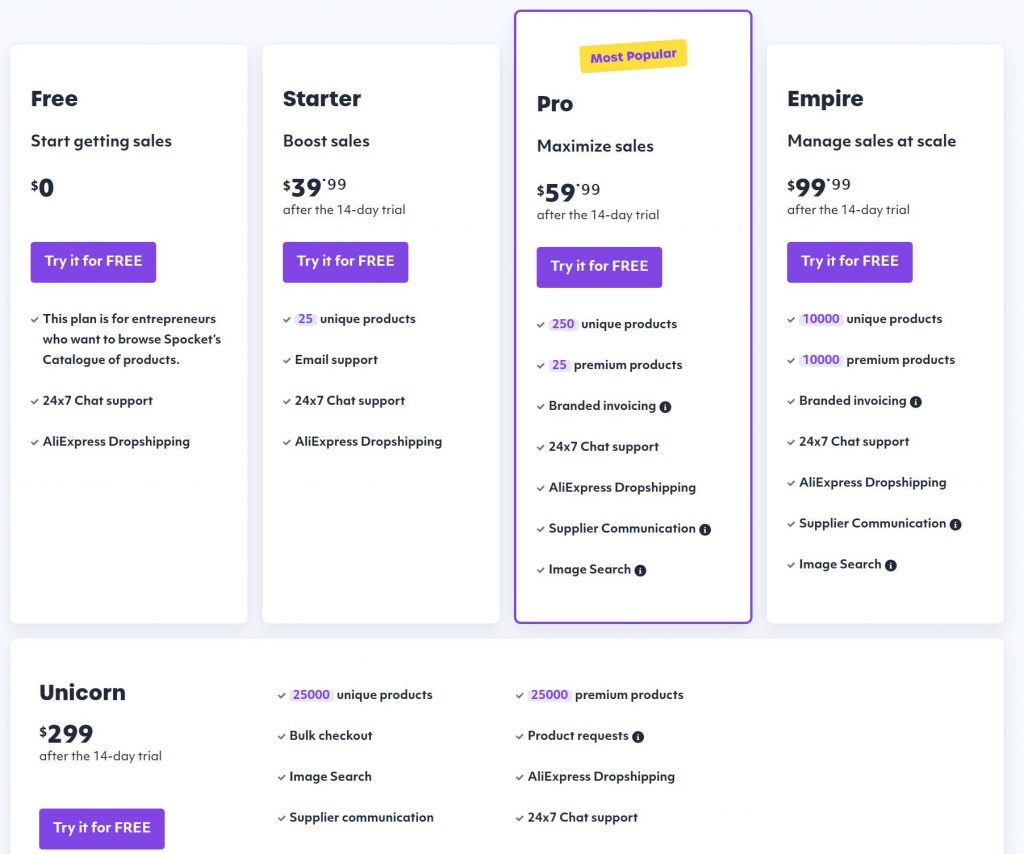
One of the standout features of Spocket is its free plan, allowing users to get started without any upfront costs. The free plan provides access to Spocket’s extensive product catalog, enabling users to browse and evaluate the suitability of the platform for their business before committing to a paid plan.
For those ready to upgrade, the Starter plan is available for $39.99 per month and offers a range of features, including the ability to import up to 25 Spocket products to your e-commerce store, real-time inventory updates, and email support. This plan also includes unlimited product orders, global pricing rules, and tracking numbers for shipments.
As your business grows and you require more product options, the Pro Plan is available for $59.99 per month ($24/month when paid annually). This plan allows for the importation of up to 250 products and includes additional benefits such as live chat and email support, branded invoices, access to Spocket’s premium products, and exclusive deals.
For users with even greater demands, the Empire Plan is available at $99.99 per month ($57/month when paid annually), offering unlimited product imports and all the features included in the Pro Plan.
In summary, Spocket offers various pricing plans to cater to different business needs and budgets. Whether you’re just starting out or looking for advanced features, Spocket has options to suit your requirements and help you build a successful e-commerce business.
⑦ Spocket Pros & Cons
Spocket Pros 👍
There are numerous advantages to using Spocket. Here are just a few of them:
- Automatic Inventory Updates:
Spocket takes care of your inventory management by providing real-time stock level updates. You can always rely on accurate information, ensuring you never sell products that your suppliers have run out of.
- Real-Time Order Tracking:
You and your customers can track the progress of orders in real-time. This feature provides peace of mind, as you can monitor the status of each order and ensure they are progressing as expected.
- One-Click Product Import:
The one-click import feature saves you significant time and effort. With Spocket, you no longer need to manually add product images and descriptions. However, you still have the flexibility to edit these details before making the product live on your e-commerce store. You can also review and select preferred product variants.
đź’ˇ Top Tip: We highly recommend rewriting product descriptions to enhance SEO efforts. Additionally, you can add and edit “alt” text for product images, which further improves the ranking of your product pages in search engine results.
- Automated Order Fulfillment:
Once a customer places an order, their information is seamlessly sent to the Spocket supplier. You will receive a confirmation email indicating that the customer’s request has been transmitted to the supplier. The supplier then prepares and ships the products directly to your customers. To track the delivery progress, you can use the “track order” button on your dashboard, ensuring transparency and peace of mind for both you and your customers.
- Automated Pricing:
Spocket offers a convenient pricing mark-up feature that automates your pricing process. You can set your profit mark-up using a multiplier, percentage, or fixed price rate. This feature prevents any accidental undercharging or overcharging of your customers.
Using Spocket, you can streamline your dropshipping operations, saving time and ensuring efficient inventory management, order fulfillment, and pricing accuracy.
Spocket Cons 👎
Like any e-commerce app, Spocket has a few limitations that you should be aware of:
Limited Supplier Locations:
Spocket primarily works with suppliers located in the United States and the European Union. If you intend to source products from suppliers outside of these regions, you may encounter higher shipping costs and longer delivery times.
Exclusion of Customs Duty and Taxes:
Spocket does not include customs duty and taxes in the overall product cost. As a result, you will need to account for these additional fees and factor them into your pricing and profitability calculations.
Incompatibility with Popular E-commerce Platforms:
While Spocket supports selling on platforms such as Shopify, Facebook Shops, Instagram, YouTube, WooCommerce, and Pinterest, it does not integrate with platforms like Amazon, eBay, Etsy, Wish, and Groupon. If you heavily rely on these platforms, Spocket may not be suitable for your needs.
Limited Packaging Customization:
Currently, Spocket does not allow customization of product packaging to align with your unique brand identity. If personalized packaging is an important aspect for your business, Spocket may not fulfill this requirement.
No Direct Contact with Suppliers:
Spocket does not facilitate direct communication between users and its suppliers. If you prefer building close relationships with suppliers and engaging in direct communication, this limitation may not align with your business preferences.
While Spocket offers numerous benefits, it’s essential to consider these limitations and assess whether they align with your specific business requirements and objectives.
â‘§ How to Set Up Spocket with Shopify
Connecting Spocket with Shopify is a seamless process that can enhance your dropshipping business. Here’s a step-by-step guide on how to integrate Spocket with Shopify:
Step 1:
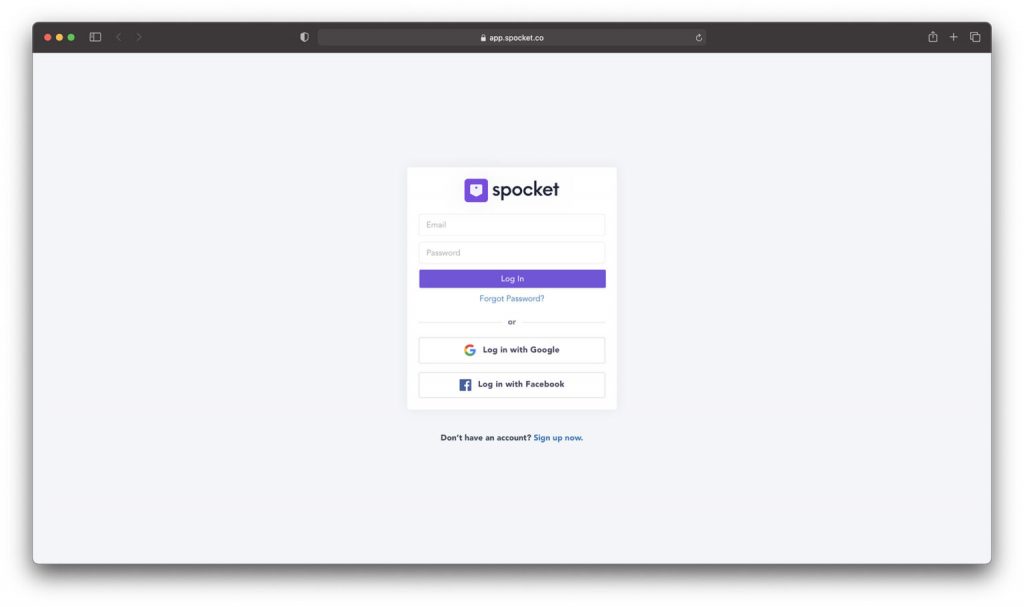
Log in to your Spocket account. If you haven’t created an account yet, sign up to access dropshipping suppliers and browse through available products. Once logged in, navigate to the My Store tab, where you can manage your automation options and explore the product catalog.
Step 2:
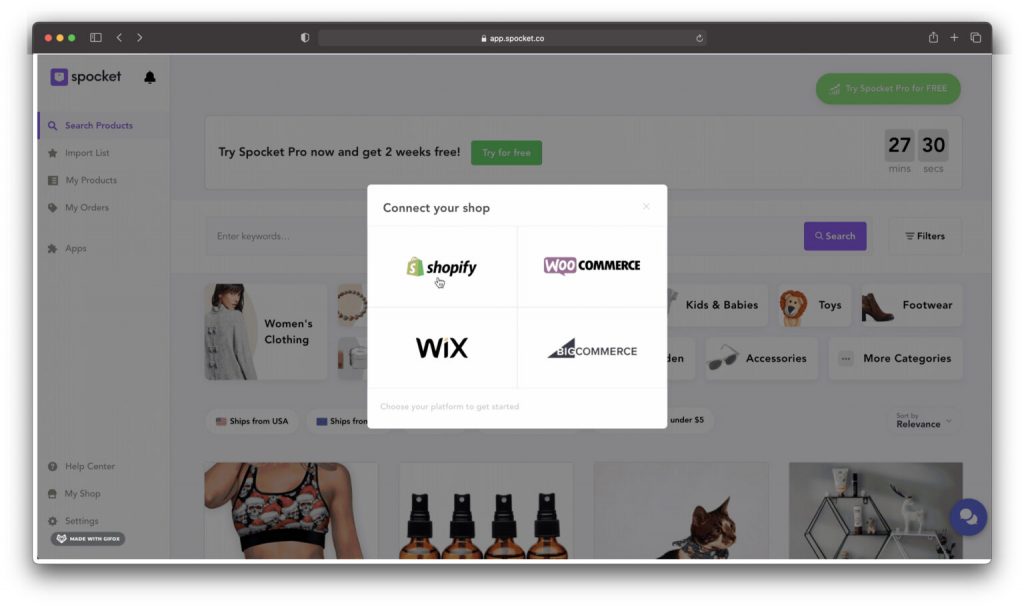
Select the Shopify option for your online business and enter your unique URL. Your Shopify URL is provided when you set up your Shopify store. Simply enter the URL, and you should be able to link your Shopify and Spocket accounts without additional instructions.
Step 3:
With the Shopify and Spocket connection established, you can easily create your Shopify store, benefiting from Spocket’s support in the USA and other supported regions. Keep in mind that customer support might be limited if you’re on the basic plan.
Alternatively, you can connect Spocket with Shopify by logging into your Shopify store and accessing the Shopify App Store. Search for “Spocket” and install the app. Grant the necessary permissions to integrate order fulfillment, processing, and fast shipping with Shopify. Use the Spocket dashboard to enter your product information and choose reliable suppliers. When selecting products and suppliers, consider shipping costs and Spocket pricing.
Spocket’s Shopify integration comes at no additional cost. Shopify seamlessly integrates with various tools and social media platforms, making it ideal for business growth. By leveraging this integration, you can enhance your dropshipping operations and streamline your online store management.
⑨ Conclusion
Spocket is an excellent solution for users engaged in vertical e-commerce, offering a range of benefits and features that make it a valuable tool for dropshipping businesses.
In conclusion, for users engaged in vertical e-commerce, Spocket offers a comprehensive solution that streamlines the dropshipping process, provides access to high-quality products, and enhances the overall customer experience. With its user-friendly interface and integration capabilities, Spocket is highly recommended for those seeking success in the world of vertical e-commerce.
â‘© FAQ
Spocket offers a wide range of products across various categories, including fashion, home and garden, electronics, beauty, and more. The platform focuses on high-quality and unique products that are suitable for dropshipping.
To import products from Spocket, you need to integrate your online store with Spocket. This can be done through supported e-commerce platforms like Shopify, WooCommerce, and BigCommerce. Once integrated, you can browse the catalog, select products, and import them directly into your store.
Yes, you can customize the products imported from Spocket. Many suppliers on the platform offer white-label or private label options, allowing you to add your own branding to the products. You can also edit product titles, descriptions, and images to align with your store’s branding.
Shipping times for Spocket products vary depending on the supplier and the customer’s location. However, Spocket focuses on working with suppliers who offer fast and reliable shipping options. Many suppliers are located in the United States and Europe, which can lead to shorter shipping times for customers in those regions.
Spocket does not handle returns and refunds directly. Since the products are shipped directly from the suppliers, the return and refund policies are determined by the individual suppliers. Retailers should communicate with their suppliers regarding their specific policies and procedures for returns and refunds.
 Spocket is available to retailers worldwide. However, the availability of certain suppliers and shipping options may vary depending on the location. It is recommended to check the platform and consult with specific suppliers to ensure their products can be shipped to your country.
To contact Spocket’s customer support, you can visit their website and access the support section. They provide various channels for assistance, including email support and a live chat feature.


