



Ad blockers have become essential tools in today’s digital world, enhancing our online experience by removing irritating advertisements and shielding us from harmful content.
Surfshark CleanWeb stands as a crucial component of the Surfshark VPN service, offering a comprehensive solution to safeguard your online activities. With CleanWeb, you not only say goodbye to intrusive ads but also protect yourself from phishing attempts, malware, and various cyber threats. It seamlessly integrates with popular web browsers such as Chrome, Firefox, and Edge, ensuring a seamless and secure browsing experience.
While Surfshark CleanWeb is undeniably impressive, there is room for improvement in its customization options. Users may desire more precise control over the types of ads they wish to block. Nonetheless, what distinguishes Surfshark is its capability to provide a complete security suite within one product, incorporating features like VPN and a private search engine, ensuring comprehensive protection for your online presence.
This Surfshark CleanWeb review will delve into its features, functionalities, performance, the introduction of CleanWeb 2.0, and its overall value, examining how it can not only eliminate ads but also enhance your browsing experience.
Table of Contents
① What is Surfshark CleanWeb?
Surfshark CleanWeb, an ad-blocking feature seamlessly integrated into the Surfshark VPN service, aims to enrich your online browsing experience by effectively removing intrusive ads, pop-ups, and banners. Beyond its ad-blocking capabilities, CleanWeb serves as a protective barrier against various online threats, including phishing attempts and malware, ensuring a smoother internet journey.
Surfshark CleanWeb 2.0 has expanded its compatibility with popular web browsers such as Chrome, Firefox, and Edge, offering users an efficient and seamless solution to enjoy a clutter-free and secure online environment. With Surfshark CleanWeb, you can traverse the web without interruptions while safeguarding yourself from potential cyber risks.
Discover more about the additional features in our comprehensive Surfshark review.
② Surfshark CleanWeb Pros and Cons
Pros
- Excellent ad blocking results
- Whitelist feature
- Multi-device compatibility
- Blocks YouTube ads
- Private search engine
- Powerful VPN included
- 7-day Free Trial
Cons
- App versions aren't as effective at blocking ads
- Limited in-app customization options
③ Is Surfshark CleanWeb Safe?
Certainly, Surfshark CleanWeb is safe. It operates as a proprietary ad blocker that filters DNS requests to block ads effectively. Moreover, it utilizes an exclusive database of recognized malicious ads and websites to detect and eliminate pop-ups, banners, and other ad types. This database is curated by a team of security professionals who continuously monitor the internet for emerging threats. This ensures that Surfshark CleanWeb remains updated with the latest malicious content.
CleanWeb is developed and maintained by Surfshark, a highly reputable VPN provider. It undergoes regular audits by independent security experts to guarantee its safety and reassure users that no data collection occurs. Generally, Surfshark has a proven track record of prioritizing security and privacy. Additionally, the company’s base in the British Virgin Islands, known for its stringent privacy laws, further reinforces its commitment to user privacy and security.
④ Surfshark CleanWeb Features
CleanWeb is an ad-blocker feature built into the powerful Surfshark VPN. Here are its detailed functionalities:
- Increases browsing speeds. Ads can take up a lot of bandwidth, which can slow down your internet connection. By blocking ads, Surfshark CleanWeb can free up bandwidth and make your browsing experience faster.
- Blocks malware and helps to avoid phishing attempts. Surfshark databases contain over 1M infected websites.
- On browser extensions, the feature is automatically enabled. On apps, it needs to be enabled manually.
- Cookie pop-up blocker prevents cookie consent requests.
- Data breach alert. This functionality alerts you about website breaches.
- CleanWeb has a bypass list to allow ads on websites of choice.
- Comes together with a VPN service subscription.
- Has a built-in antivirus with additional cost (on apps).
- Surfshark Search search engine prevents tracking and targeted ads.
- Shows how many ads, trackers, or malware have been blocked on the website.
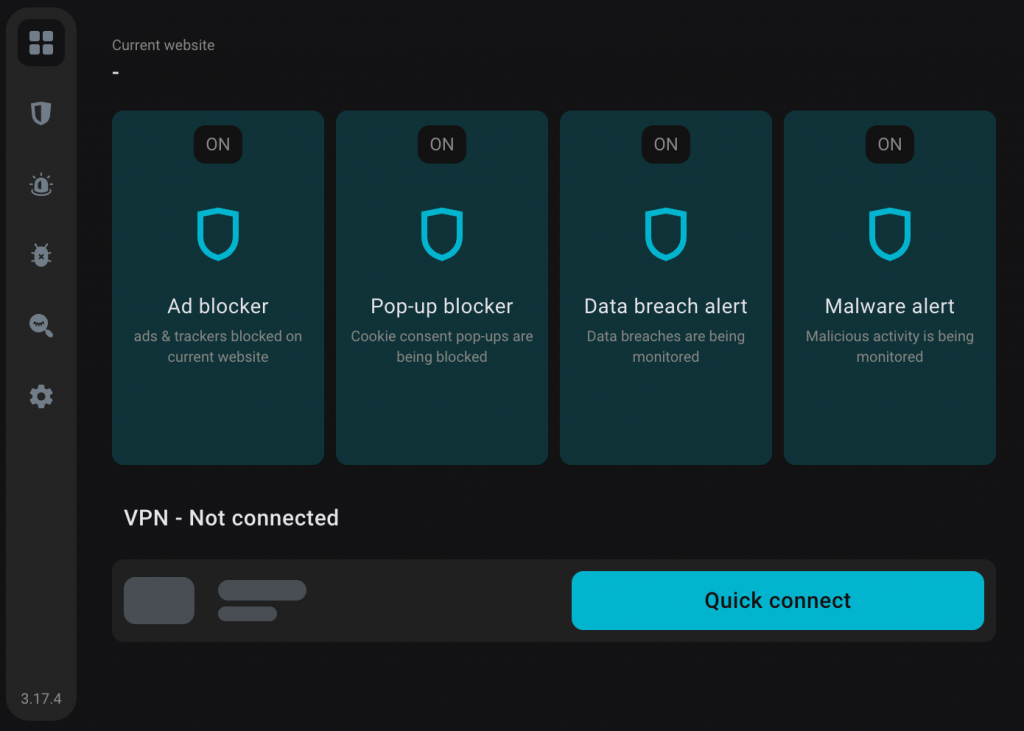
The extension version (CleanWeb 2.0) is a fuller version of CleanWeb. It has options to enable and disable Blockers (Ad blocker and Cookie popup blocker) and Site Safety (Data breach alert and Malware alert).
⑤ Surfshark CleanWeb capabilities
After testing numerous ad blocker tools, Surfshark CleanWeb emerges as one of the premier choices for eliminating a wide array of online advertisements. Employing a blend of DNS filtering and an exclusive catalog of recognized malicious ads and websites, Surfshark CleanWeb preemptively obstructs ads before they have a chance to load on your device.
Surfshark CleanWeb effectively blocks the following types of ads:
Contextual advertising: CleanWeb can thwart contextual ads, the most prevalent form of online advertising, which are tailored to the content of the webpage you’re browsing. For instance, if you’re reading an article about cars, you might encounter ads for car dealerships or auto insurance companies.
Banner advertising: CleanWeb efficiently halts banner ads, a ubiquitous form of display advertising consisting of static images or animated GIFs.
Video ads: Surfshark CleanWeb excels at thwarting various in-video ads, including those found on streaming platforms, making it one of the top choices for blocking YouTube ads. It effectively disables video ads typically played before, during, or after a video. Our tests reveal that CleanWeb 2.0, integrated with the Chrome browser, successfully blocked all video ads on platforms like YouTube and Facebook.
Malware: Surfshark CleanWeb has the capability to intercept certain types of malware, including malicious ads, which pose a threat to your device by potentially causing harm or stealing personal information.
Pop-ups and banners: CleanWeb suppresses intrusive pop-ups and banners, thereby enhancing your browsing experience and allowing you to focus on desired content.
Trackers: CleanWeb thwarts trackers, small files embedded by websites to monitor your browsing activity, gather personal data, and tailor ads to you, thereby bolstering your privacy protection.
In summary, Surfshark CleanWeb stands out as an effective ad blocker, offering comprehensive protection against a variety of online nuisances, including ads, malware, pop-ups, banners, and trackers.
⑥ Surfshark CleanWeb Pricing
CleanWeb is included in all Surfshark VPN subscription plans. You don’t have to pay anything extra for it. Here are its main plans and prices:
| Subscription Plan | Monthly Price |
| One month | $10.99/month |
| 1-year plan | $3.99/month |
| 2-year plan | $2.39/month |
The best value for money is with its 2-year plan for $2.39/month. Alternatively, if you’re not keen on a long-term option, the 1-year plan for $3.99/month or just a single-month plan for $10.99 is also available. For what it offers, Surfshark CleanWeb is very affordable compared to its contenders – Total Adblock or NordVPN Threat Protection, also varying around the same price.
Surfshark CleanWeb is also included in the Surfshark One bundle, in which you also get a VPN and antivirus package. It’s ideal if you want an all-around security suite. However, if you’re looking for an ad blocker only, Surfshark CleanWeb (included in a VPN package) will do the job.
Here are the payment options that Surfshark accepts:
- Credit card (Visa, Mastercard, American Express, Discover)
- PayPal
- Google Pay
- Apple Pay
- Cryptocurrency (Bitcoin, Ethereum, Litecoin, Ripple)
- Surfshark gift card
If you’re not sure which subscription plan is right for you, Surfshark offers a 30-day money-back guarantee or a 7-day free trial. So, you can try it risk-free and see if you like it.
⑦ Customer Support
24/7 live chat: This option offers easy and readily available support. We found it convenient as we were able to connect with a customer support representative within a few minutes. They promptly and accurately addressed our inquiries.
Knowledge base: Surfshark’s knowledge base proved to be comprehensive and user-friendly during our testing. It was easy to navigate, and we could find answers to most of our questions without needing to reach out to customer support.
Email: For issues not covered in the knowledge base or live chat, you can always reach out to Surfshark via email. We tested this option and received a response from Surfshark’s customer support team within 24 hours, demonstrating its effectiveness and relatively swift turnaround time.
⑧ Is Surfshark CleanWeb effective and worth investing in?
In summarizing our experience with Surfshark CleanWeb, it undeniably left a strong impression on us, establishing itself as a benchmark among ad blockers. CleanWeb excels in seamlessly removing intrusive ads, trackers, and malware, thereby enhancing the browsing experience by ensuring smoother and safer navigation.
What particularly stood out to us about Surfshark CleanWeb was its intuitive interface and its compatibility across various devices and platforms. Additionally, the inclusion of CleanWeb as part of Surfshark’s comprehensive security suite adds considerable value, guaranteeing complete protection against online threats. Without question, Surfshark CleanWeb is a highly recommended choice for those seeking a comprehensive and hassle-free cybersecurity solution.
⑨ FAQ
Surfshark CleanWeb is an ad-blocking and online security feature integrated into the Surfshark VPN service. It is designed to enhance your browsing experience by blocking intrusive ads, trackers, malware, and other online threats.
Surfshark CleanWeb works by filtering DNS requests and utilizing a proprietary list of known malicious ads and websites to block ads and online threats before they can reach your device.
Surfshark CleanWeb blocks various types of ads, including contextual ads, banner ads, and video ads, along with pop-ups and banners. Additionally, it can block malware and trackers to protect your online privacy and security.
Yes, Surfshark CleanWeb is compatible with popular web browsers such as Chrome, Firefox, and Edge, ensuring a seamless browsing experience across different platforms.
Yes, Surfshark CleanWeb can be used on multiple devices simultaneously, providing ad-blocking and online security protection across all your devices.
Surfshark CleanWeb is designed to minimize any impact on internet speed while providing comprehensive ad-blocking and online security protection.
Yes, Surfshark CleanWeb is included as a standard feature with every Surfshark VPN subscription, offering users complete online protection.
While Surfshark CleanWeb offers default settings for effective ad-blocking and online security, users can customize certain aspects of the feature according to their preferences.
No, Surfshark CleanWeb does not collect any user data. It operates solely to enhance your online browsing experience by blocking ads and online threats.
You can reach Surfshark’s customer support team through various channels, including 24/7 live chat, email support, and a comprehensive knowledge base, for assistance with any queries or issues related to Surfshark CleanWeb.

