




Have you ever received a notification indicating unusual activity on your account? This suggests that criminals are attempting to gain access to your digital accounts or have already done so. Wondering why you? In short, your sensitive details have likely been compromised online, making you an easy target for criminals.
While this may sound alarming, I’m here to assure you that there is a solution to avoid such a frightening situation. That solution is called Surfshark Alert.
Table of Contents
① What is Surfshark Alert?
Surfshark Alert is a security feature incorporated into our Surfshark One package, designed to safeguard your sensitive information from unauthorized access.
It actively monitors your credentials for potential data breaches across the internet and promptly notifies you if any breach is detected. This proactive approach enables you to take immediate action to protect and secure your online accounts.
② What is a data breach?
A data breach refers to a cyberattack conducted by hackers targeting companies’ databases with the intent to steal data. High-profile companies such as LinkedIn and Facebook have frequently fallen victim to these breaches.
However, it’s essential to recognize that data breaches pose significant risks to both businesses and their customers. The stolen data is often leaked on the internet or sold on the dark web, compromising individuals’ privacy and security. Therefore, it’s crucial to remain vigilant about this threat and take necessary steps to protect yourself.
③ Why should you choose Surfshark Alert?
The moment has arrived to clarify the role of Surfshark Alert in relation to data breaches. Firstly, it’s important to note that Surfshark Alert does not prevent data breaches. However, it serves as a crucial tool in mitigating potential harm by promptly notifying you of breaches, enabling you to take swift action.
Without delay, here are the top 5 reasons why you should utilize Surfshark Alert:
1.Safeguard yourself against cybercrime
Criminals have various ways to exploit your stolen data. Some examples include:
- Payment card fraud: Criminals may use your stolen data to make unauthorized purchases or open new credit accounts in your name.
- Fake accounts: Your information could be utilized to create fraudulent accounts for illicit activities such as phishing or impersonation.
- Doxxing: Your private or controversial information may be exposed online or in the media without your consent.
- Surveillance: Cybercriminals may monitor your online activities to influence your opinions, potentially impacting elections or customer perceptions.
- Impersonation: Criminals may pose as you or a loved one to solicit money or trick you into revealing sensitive information.
- Black market sales: Stolen data can be sold on underground markets, exposing you to further risks.
- Blackmail: Cybercriminals may demand ransom in exchange for not disclosing your personal information.
Surfshark Alert notifies you of any breaches involving your data, allowing you to promptly change passwords on compromised accounts and notify your bank before any further damage occurs.
2.Easily Monitor Your Critical Data
Surfshark Alert simplifies the monitoring of your essential data with just a few clicks. Here are the types of information you can monitor:
- Email addresses: Detect unauthorized access to your accounts and identify any leaked passwords or other sensitive data.
- Credit cards: Safeguard yourself against criminals engaging in fraudulent transactions using your card details.
- National IDs: Prevent identity theft and the misuse of your personal information for phishing or impersonation scams.
Moreover, with just one subscription, you can add an unlimited number of details, extending coverage to your family members as well!
3.Stay up-to-date
Keeping yourself updated is crucial in all aspects of life, and identity protection is no different. Surfshark Alert offers the following benefits:
- Comprehensive coverage of the largest database of leaked data records ensures that no breaches go unnoticed, regardless of their age.
- Regular updates ensure fast acquisition of newly leaked data, keeping you informed about the latest breaches.
- Unlike other services that check only specific databases, Alert scans the entire internet thoroughly in just two days.
- Continuous real-time monitoring and email notifications ensure that you are promptly informed about any new breaches.
- Detailed information about the breach, including specific passwords, hashed passwords, IP addresses, locations, and usernames linked to the leaked email address, is provided.
- Insights into how and when the breach occurred allow you to learn more about the incident.
4.Use it for business too
Surfshark Alert isn’t limited to personal use; businesses are also encouraged to utilize the service. It serves as a valuable tool in mitigating the various consequences that companies may face as a result of data breaches, including:
- Damage to consumer and partner trust
- Theft of intellectual property
- Decline in brand reputation
- Temporary operational disruptions
- Government fines
5.Enjoy an all-in-one package
To access Surfshark Alerts, you’ll need to subscribe to the Surfshark One security bundle. This bundle not only includes Alert but also:
- Surfshark Search: A private search tool (akin to a genuine Incognito mode for searches you wish to keep confidential) offering ad-free organic search results and shielding against search engine monitoring.
- Surfshark Antivirus: Software designed to scan your devices for malware that could potentially compromise your device or exploit it for financial gain.
Additionally, don’t forget our 30-day money-back guarantee. With this assurance, there’s absolutely nothing to lose!
④ How do you sign up for Surfshark Alert?
It’s pretty easy. All you have to do is purchase our Surfshark One security suite.
However, this process is different for customers that already have Surfshark VPN and those who don’t yet.
For new Surfshark customers
If you’re a newcomer, you would have to:
Step 1. Visit our order page here.
Step 2. Select a VPN plan (currently, the 2-year deal is the best bang for the buck!).
Step 3. Scroll down and click the red “Activate Surfshark One” button.
Step 4. Choose a payment method.
Step 5. Fill in the details and submit your order.
Step 6. Set up a password.
Step 7. Log in to your account.
Step 8. Set up 2FA authentication.
Step 9. Proceed to the “Alert” tab on the left of your account page.
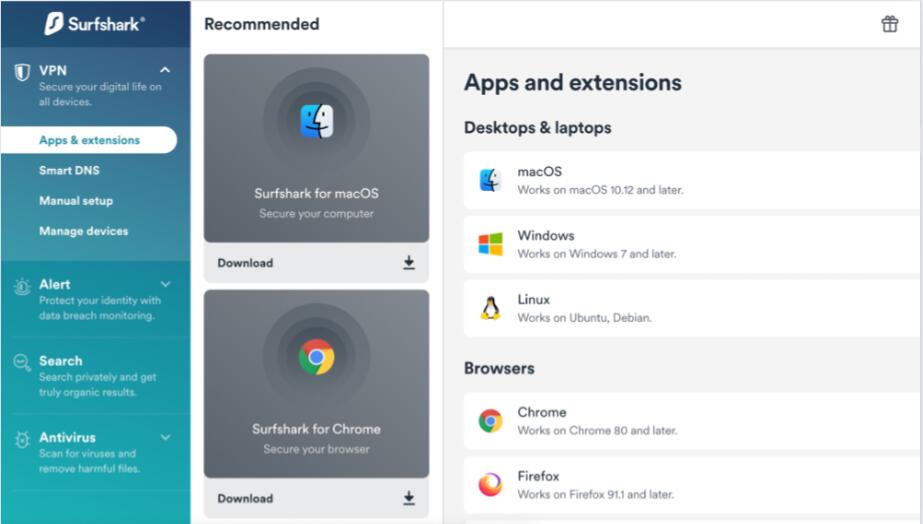
For existing Surfshark customers
If you already use Surfshark VPN (we’re delighted to have you on board!), you would only need to:
Step 1. Log into your account.
Step 2. Click on the “Alert” section. It will take you to our order page, where you can order Surfshark One for the remaining period of your VPN subscription.
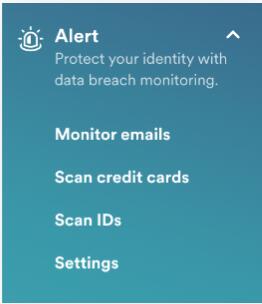 Afterward, you’ll need to set up 2FA if you haven’t yet. Then, return to the “Alert” section on your account page, and you’re good to go!
⑤ How to monitor emails using Surfshark Alert?
⑥How to monitor credit cards using Surfshark Alert?
⑦ Surfshark Alert Pricing
Surfshark Alert is included in all Surfshark VPN subscription plans. You don’t have to pay anything extra for it. Here are its main plans and prices:
| Subscription Plan | Monthly Price |
| One month | $10.99/month |
| 1-year plan | $3.99/month |
| 2-year plan | $2.39/month |
The best value for money is with its 2-year plan for $2.39/month. Alternatively, if you’re not keen on a long-term option, the 1-year plan for $3.99/month or just a single-month plan for $10.99 is also available. For what it offers, Surfshark CleanWeb is very affordable compared to its contenders – Total Adblock or NordVPN Threat Protection, also varying around the same price.
Surfshark CleanWeb is also included in the Surfshark One bundle, in which you also get a VPN and antivirus package. It’s ideal if you want an all-around security suite. However, if you’re looking for an ad blocker only, Surfshark CleanWeb (included in a VPN package) will do the job.
Here are the payment options that Surfshark accepts:
- Credit card (Visa, Mastercard, American Express, Discover)
- PayPal
- Google Pay
- Apple Pay
- Cryptocurrency (Bitcoin, Ethereum, Litecoin, Ripple)
- Surfshark gift card
If you’re not sure which subscription plan is right for you, Surfshark offers a 30-day money-back guarantee or a 7-day free trial. So, you can try it risk-free and see if you like it.
⑧ Customer Support
24/7 live chat: This option offers easy and readily available support. We found it convenient as we were able to connect with a customer support representative within a few minutes. They promptly and accurately addressed our inquiries.
Knowledge base: Surfshark’s knowledge base proved to be comprehensive and user-friendly during our testing. It was easy to navigate, and we could find answers to most of our questions without needing to reach out to customer support.
Email: For issues not covered in the knowledge base or live chat, you can always reach out to Surfshark via email. We tested this option and received a response from Surfshark’s customer support team within 24 hours, demonstrating its effectiveness and relatively swift turnaround time.
⑨ In summary
In conclusion, Surfshark Alerts emerges as a paramount solution in the realm of cybersecurity, offering unparalleled protection against the ever-looming threat of data breaches. By promptly notifying users of any potential breaches involving their sensitive information, Surfshark Alerts empowers individuals to take immediate action, mitigating the risk of further damage. Its comprehensive coverage of vast databases, coupled with real-time monitoring and detailed breach insights, ensures users stay ahead of cyber threats.
Moreover, Surfshark Alerts is not limited to personal use; it extends its protective capabilities to businesses, helping safeguard consumer trust, intellectual property, and brand reputation. Bundled within the Surfshark One security package alongside Surfshark Search and Surfshark Antivirus, Surfshark Alerts offers users an all-in-one security solution, ensuring comprehensive protection across various online activities.
With a 30-day money-back guarantee in place, Surfshark Alerts stands as a risk-free investment, providing peace of mind in today’s digital landscape. Therefore, I strongly recommend Surfshark Alerts to all users seeking robust protection against data breaches and cyber threats.
⑩ FAQ
Surfshark Alerts is a security feature provided by Surfshark VPN that notifies users about potential data breaches involving their personal information.
Surfshark Alerts continuously monitors various databases and sources for leaked data records. If any breaches involving the user’s information are detected, it promptly notifies the user via email.
Yes, Surfshark Alerts is included in all Surfshark VPN plans, offering an additional layer of security to users.
Surfshark Alerts monitors various types of data, including email addresses, credit card details, and national IDs, to detect potential breaches.
Yes, users can customize their alert preferences, including the frequency of notifications and the types of breaches they want to be notified about.
Surfshark Alerts scans for data breaches continuously, ensuring that users are promptly notified of any potential security threats.
Yes, Surfshark Alerts can be used for both personal and business purposes, providing comprehensive protection against data breaches for individuals and organizations alike.
No, Surfshark Alerts does not collect any personal information from users. It operates solely to monitor data breaches and notify users accordingly.
Yes, Surfshark Alerts can be used on multiple devices, as it is integrated into the Surfshark VPN service.
If you receive a notification from Surfshark Alerts about a data breach, it is recommended to change the passwords associated with the affected accounts and monitor for any suspicious activity. Additionally, consider enabling two-factor authentication for added security.

